AI Energy – a home battery that knows when to sell, and tells you why

AI Energy is my Home Assistant integration. Every 15 minutes it uses OKTE spot prices and the grid tariff to decide when to charge the home battery cheaply from the grid, when to sell from it and when to charge the car. Every decision comes with what it does and why. It works with any inverter and is set up in a wizard, no YAML needed. Current version 0.9.5, open source under the MIT license.
I don't like not knowing what is happening in my house and why. A battery that buys and sells electricity on its own is exactly where I want to know the most. It's about money, after all.
That's why I built AI Energy. Every decision it makes comes with a written reason, for example:
Sell 331 € ≥ threshold 328 € (morning until 13:45, SOC 64 % / min 13 %)
In this article I show why the integration exists, how it plans the day, what surprised me during development and how to install it.
How it started
At home I have solar with a roughly 34 kWh battery, a Deye inverter connected to Home Assistant through the Solarman integration, a SmartEVSE wallbox (11 kW) and an electric car. I buy grid electricity from ZSE (Slovakia) on the DD3 EV rate:
| When | Price | |
|---|---|---|
| Buying – low tariff (LT) | 23:45–05:45 and 13:45–15:45 | ~0.12 €/kWh |
| Buying – high tariff (HT) | otherwise | ~0.21 €/kWh |
| Selling | a different price every 15 minutes | OKTE spot minus ~0.015 €/kWh |
In the evening the spot price is usually 0.30–0.60 €/kWh, at night around 0.20. So the idea is simple: charge the battery cheaply in the low tariff and sell in the most expensive 15-minute slots of the day.
Simple on paper. In practice, every 15 minutes you're juggling battery capacity, inverter power, sunshine, house consumption, the car and the main breaker.
At first I built everything directly in Home Assistant – automations, Jinja templates, the plan as a template sensor. It worked, but only I could set it up. So I rewrote it all in Python as a HACS integration that anyone can configure without YAML. I developed it together with AI (Claude) in about two weeks – from the first automations to version 0.9.5.
What AI Energy does
- Reads spot prices from the OKTE integration (or Nord Pool), today and tomorrow in 15-minute slots. It keeps its own price backup that survives a Home Assistant restart and an OKTE portal outage.
- Plans the battery for today and tomorrow in 15-minute slots.
- Recommends a mode with a reason – and if you let it, switches the mode too.
- Charges the car in the low tariff, from solar surplus or on cheap spot prices.
- Shows everything on cards installed together with the integration.
This is the Electricity price card with tomorrow's plan (Slovak UI):
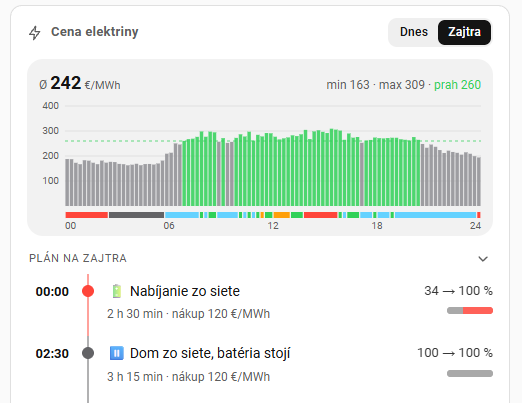
Tomorrow is a quiet day: spot only 163 to 309 €/MWh, selling threshold 260. Below the chart is a coloured strip of actions and below that the plan as a timeline – at midnight charging from the grid from 34 to 100 % at 120 €/MWh, from 2:30 the house runs from the grid and the battery waits for pricier slots.
How it plans the day
The day is split into windows between low tariffs: morning (after the night LT until the afternoon one) and evening (after the afternoon LT until the night one). In each window the integration:
- Works out how much energy the battery will have – from LT charging, from what's left from the previous window and from the sun according to the Solcast forecast.
- Sells in the most expensive slots that energy can cover. The price of the cheapest of them is the selling threshold.
- Charges in the LT only as much as needed – for the sales and, if cheaper than HT, for the house consumption until the next LT.
The result is a 15-minute plan where each slot has one action:
| Action | What happens |
|---|---|
| 💰 Sell from battery | the battery exports to the grid |
| 🌤️ Sell solar only | only what the panels produce right now is sold |
| 🔋 Charge from grid | cheap charging in the LT |
| ☀️ Solar charges battery | the sun tops up for a later sale |
| Surplus to grid | the battery is full, surplus goes out |
| ⏸️ House from grid | the battery holds and waits for pricier slots |
| 🏠 House from battery | normal operation |
The plan drives the recommended mode (sensor.ai_energy_odporucany_rezim) and one sentence explaining why (sensor.ai_energy_dovod).
Brain in the integration, hands in the automation
The biggest problem with battery control is that every inverter is controlled differently. I didn't want to write support for each one.
So AI Energy writes the mode into a select (input_select) that your own inverter automation acts on. In the wizard you map each AI Energy mode to an option of that select – for example Sell from battery → Export from Battery, Charge from grid → Charge from Grid. The integration decides what, the automation knows how. That's why it works with any inverter.
- Battery – control. While this switch is off, the integration only recommends and switches nothing. A safe start.
- Manual mode for a while. 1 h, 2 h, 4 h, until the next LT or permanently – then it returns to Auto by itself.
- Current guard. Optionally it watches the battery's grid charging current: a shared cable with the wallbox (the battery has priority) and the main breaker.
Charging the car
Modes: Off / Charge now / Charge from time / AI. In AI mode the car charges:
- in the low tariff at the full current the breaker allows,
- from solar surplus – the current follows the surplus, switches on after 2 minutes of surplus and off after 3 minutes without it. While the battery is selling, surplus is not used for the car,
- optionally on cheap spot prices.
You enter the main breaker in amps (e.g. 3 × 25 A) and the integration keeps a 10 % reserve. It works with any charger that has a switch or mode select and a current setting in Home Assistant. SmartEVSE is pre-filled automatically.
Three dashboard cards
The cards install together with the integration – nothing to copy or add as a resource.
- Igy Price Action Card – price chart for today and tomorrow, selling threshold and the battery plan as a timeline, e.g. Sell from battery 16:30–18:00 · 91 → 44 %. For charging and "house from grid" it shows the purchase price by tariff.
- Igy Battery Action Card ("AI settings") – state of charge, battery power (green charging, red discharging), current mode and reason. Behind the Settings button: inverter mode, min/max SOC and minimum selling price.
- Igy EV Action Card – car charging mode, time, current and sources for AI (LT / solar / spot).
Everything is clickable and opens the entity details with history.
A wizard for normal people
The wizard shows only the steps that apply to you:
Welcome → Spot prices → Buying (LT times, prices) → Selling (spot minus fee / fixed feed-in price / not selling) → Battery and house consumption → Solar (Solcast) → Inverter control → EV charger → Breaker and meter → Done.
Every field explains what belongs there, with an example. SmartEVSE and OKTE are detected automatically.
What development taught me
A few things that aren't obvious at first – and that I had to work out.
The minimum selling price is just a safety net
Most people expect that lowering it means selling more. It doesn't. Sales are driven by the energy in the battery: it sells in only as many of the most expensive slots as the energy covers. That's why the card says something like "changes nothing right now – selling from 0.295 €/kWh".
Min SOC is a target, not a wall
In AI Energy, minimum state of charge means where the battery should end up before the next LT. Selling stops in time so that after the house consumption until the night LT the battery sits at the minimum. The hard floor is held by the inverter.
I also ran the opposite case: sell more and power the house from the grid afterwards (selling at 0.40 vs. buying at HT 0.21 €/kWh). I decided that min SOC is the end-of-day target – in the evening the house runs from the battery.
Selling during an expensive low tariff? Usually not
Even when spot is high during the LT, you can't charge and sell at the same time. Every 15 minutes of selling in the LT means 15 minutes less charging. A real example: selling at 455 €/MWh in the LT, with an expensive evening (347 €/MWh), came out at −0.23 € per slot.
Don't sell everything in the morning when the evening is the harvest
If the battery sold everything in the morning at 330–400 €/MWh, the afternoon LT (2 h × 10 kW = 20 kWh) couldn't fill it for an evening at 600 €/MWh. So the plan keeps a morning reserve: what the LT can't charge, minus the sun still to come.
Charging in the LT for the house pays off too
It does when the LT price with losses (divided by 0.9) plus battery wear (0.045 €/kWh) is below HT. On DD3: 0.12 / 0.9 + 0.045 = 0.178 € < 0.21 €/kWh. The difference is ~0.03 €/kWh – about 0.30 € a day for 10 kWh in the morning. Small, but every day.
Hysteresis against flapping
A new sale only starts when there's energy for at least one full 15-minute slot. LT charging starts only 3 % below target. And the same rules apply to the plan and to the recommendation – so the card doesn't lie.
For advanced users: under the hood
Limitations – honestly
- It controls the battery through a mode select and your own inverter automation. There's no ready-made Deye blueprint yet.
- The planner is rule-based, not a mathematical optimizer. On unusual days it may miss the true optimum – for example it never sells during its own LT, even when that would exceptionally pay off.
- Spot-priced buying and virtual battery schemes are not supported yet.
- The plan relies on the solar forecast and an estimate of house consumption. When the forecast is wrong, so is the plan – but it's recalculated every minute.
- So far it's developed and tested on one house: ZSE DD3, Deye, SmartEVSE.
What's next
- An optimizer (dynamic programming): for every 15-minute slot it tries charge / sell / nothing and picks the highest profit. It could also explain the "value of a kWh in the battery" – e.g. "at 12:00 a kWh is worth 0.58 €, because it will sell for 600 in the evening". It will first run in the shadow next to the current plan.
- A Deye/Solarman blueprint.
- Spot-priced buying, more tariffs and grid operators.
Installation step by step
You need HACS, the OKTE integration (or Nord Pool) and a battery state-of-charge sensor in %. Optionally Solcast, an EV charger in Home Assistant and an inverter mode select with an automation.
- HACS → ⋮ → Custom repositories → paste
https://github.com/Igypop78/ai-energy, type Integration. - Download AI Energy and restart Home Assistant.
- Settings → Devices & services → Add integration → AI Energy and go through the wizard.
- Add the Igy Price Action Card, Igy Battery Action Card and Igy EV Action Card to your dashboard.
- Leave control off and compare the recommendations with what you'd do yourself for a few days. Then turn on Battery – control and disable your old automations so they don't overwrite each other.
Try it and let me know
AI Energy is open source under the MIT license: github.com/Igypop78/ai-energy.
So far it runs on one house – mine. If you have a different tariff, inverter or charger, I'd love to hear how it works for you. Write to ahoj@tinkermyhome.com or open an issue on GitHub.