Pattern Pilot – a Home Assistant integration that learns what you do by hand and suggests automations

A smart home is smart when it does things for you. Pattern Pilot is my Home Assistant integration that watches what you do by hand, learns how things connect (water, electricity, motion, type of day) and after a few weeks suggests automations – each with proof from your own history. It never acts on its own and runs fully local. It is still in development (version 0.2.0); in our house it has been collecting data since November 4.
A smart home is only truly smart when it does things for you. Most of us don't even realise how many small routine things we do by hand every day – and how many of them could be automated. Or we think our habits are so irregular that automating them is impossible.
But a lot of things at home are connected. When water usage jumps in the morning, someone is up and taking a shower. So it's quite likely the morning automation should run. And the other way round: on a public holiday, or when we're home sick in bed, no water runs, the kettle stays cold – and the morning routine doesn't start. The same goes for electricity use, motion in rooms or lights.
These are exactly the connections Pattern Pilot watches. In this article I'll show why I built it, how it works, what my own house taught me in the first 12 days and how you can try it yourself.
How it started: the car at 7:20
I have an automation that pre-heats the car every morning at 7:20. It works reliably – except on days when I don't go to work. Then the car warms up for nothing.
Yet on days when I do go to work, a few things happen at home that give it away. Getting up around 6:40, lights, a shower, water flowing, coffee, motion in several rooms. The house "knows" sooner than any calendar.
That led to a question: couldn't Home Assistant figure out on its own what I do by hand, again and again, and suggest an automation?
I wasn't looking for "AI that invents automations". I wanted a tool that:
- looks at real behaviour in the house, not at a list of devices,
- can explain every suggestion and verify it against history,
- never acts on its own – I have the final say.
What Pattern Pilot is
Pattern Pilot is a Home Assistant integration you install via HACS. It watches what people do by hand at home, learns routines and suggests automations. For every suggestion it shows proof from your own history, e.g. "9 of 9 workdays, 0 misfires in the backtest". An automation is only created after you click Accept.
Everything stays at home: no cloud, no large language models (LLMs). And there's nothing to configure by hand – it finds sensors, Energy dashboard meters, public holidays and weather on its own.
This is the Suggestions tab of the card that ships with the integration:
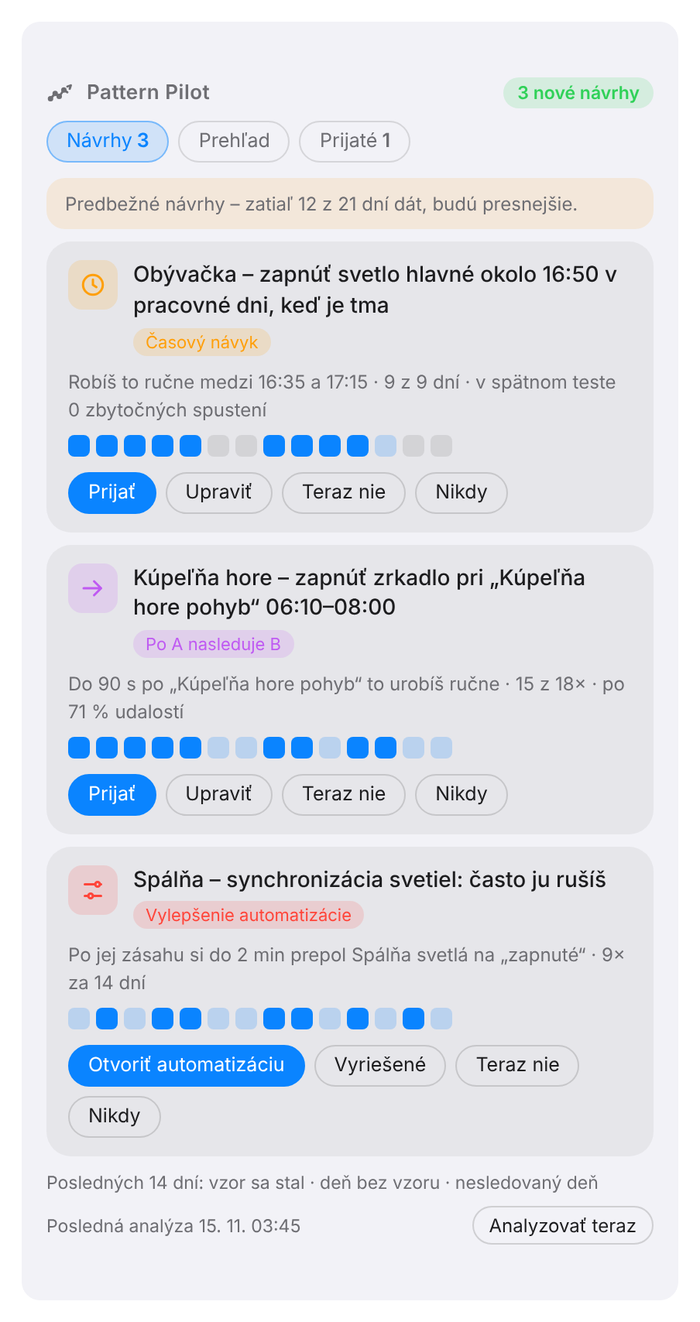
Illustrative preview of the v0.2.0 card with sample data (Slovak UI). I'll add real suggestions from our house after Nov 25.
How it works
Simplified, in six steps:
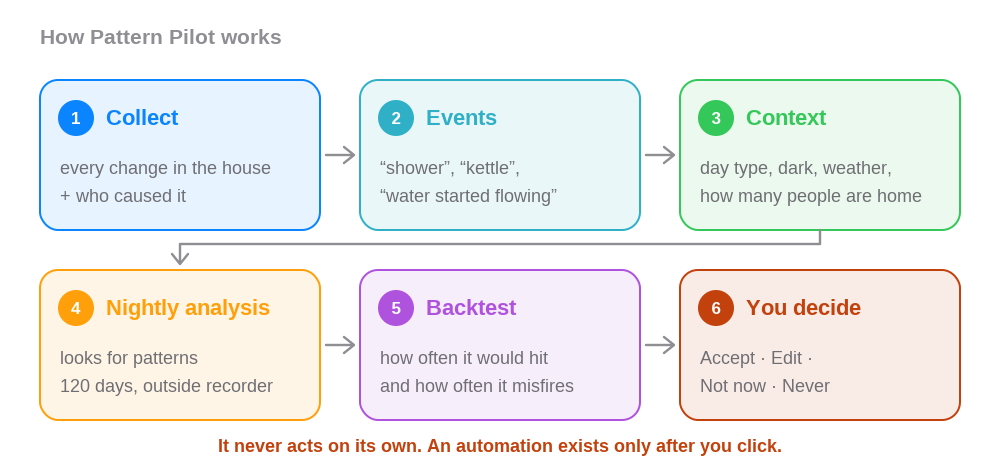
- Collect – and who did it. The integration listens to changes in the house and works out who caused each one: you in the app or by voice, a wall switch or remote ("outside HA"), an automation, another integration, or the device itself – e.g. a thermostat following its own schedule. This distinction is key. Suggestions only make sense from what you do.
- Events instead of numbers. It doesn't store raw sensor values, only what matters: "bathroom humidity jumped" (shower), "power draw spiked" (kettle), "water started flowing".
- Context. With every manual action it remembers the type of day (workday, weekend, holiday), whether it's dark, the sun's elevation, outdoor temperature and how many people are home.
- Its own history. It keeps its own 120-day database, independent of the recorder. Home Assistant's recorder keeps 10 days by default – not enough to find habits.
- Nightly analysis. It looks for patterns and backtests each one: it "replays" it over history and counts how often it would have been right and how often it would have fired for nothing.
- You decide. Accept, Edit, Not now, or Never.
What it suggests
Version 0.2.0 knows three kinds of suggestions:
| Kind | What it means | Example |
|---|---|---|
| Time habit | you do the same thing by hand at a similar time | "Living room – turn on the main light around 16:50 on workdays when it's dark" |
| A is followed by B | after motion, a door opening, a button or arriving home, you do the same thing within 90 seconds | "Upstairs bathroom – turn on the mirror on motion 6:10–8:00" |
| Automation improvement | you keep undoing an existing automation right away | "Bedroom – light sync: you often cancel it" |
The third kind is my personal favourite. An automation you keep correcting by hand isn't a helper, it's a nuisance – and you often don't even notice.
To keep suggestions from being random, there are strict thresholds:
- Time habit: at least 5 days and 60 % of eligible days. In the backtest it would misfire at most twice a week. It won't suggest anything another automation already does.
- A is followed by B: at least 5 times, explains at least half of the manual actions and follows at least 40 % of triggers in that time window. Repeated motion within 10 minutes counts as one event.
- Improvement: at least 3 cancellations in 14 days.
When you accept a suggestion, a normal Home Assistant automation is created, named "Room – what it does" with the proof in its description. It only acts if the device isn't already in the target state – it won't turn on a light that's already on.
The card: what really happens in your house
Besides suggestions, the card has an Overview tab. It shows learning progress ("Day 12 of 21"), the daily rhythm (manual actions per hour, today vs. average), who runs the house and what you do by hand most often. There's nothing to copy or add as a resource – the card ships with the integration.
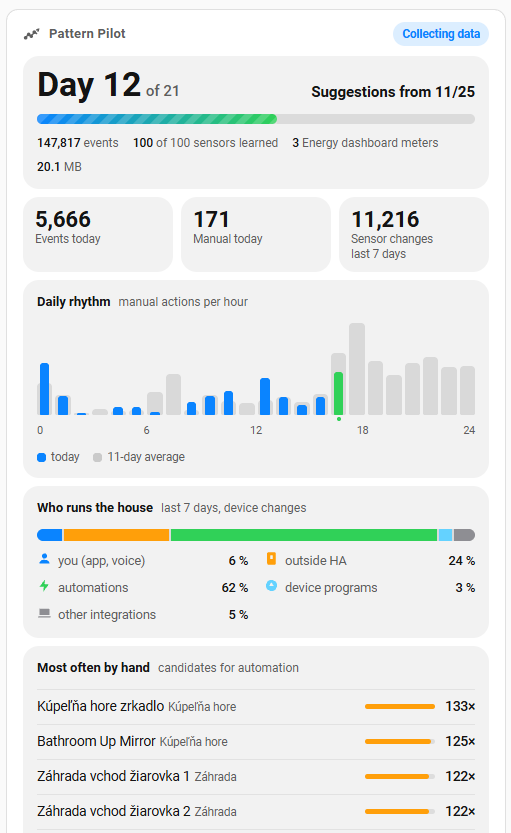
The real Overview from our house on day 12. Notice the bathroom mirror listed twice – that's exactly the bug I describe below.
Honestly, the Overview alone was an eye-opener. I had never seen before who actually runs my house.
Developing on a real house: numbers and mistakes
I developed Pattern Pilot right on our house. Versions 0.1.0 to 0.2.0 came out within 12 days. And reality humbled me very quickly.
Day one: most "manual" actions were fake
On day one the integration recorded 4,760 events, 263 of them "manual". Most of them weren't manual at all. Top of the list:
- the gate – we share a gate that neighbours also open with their own app directly on the device, so it looked like a manual action outside HA,
- two garden bulbs,
- the thermostat, which changes temperature on its own schedule.
None of that is "my routine". I had four things to fix.
Problem 1: Zigbee answers late
Devices via Zigbee2MQTT and MQTT confirm their new state a moment later, without the original trace of who sent the command. To Home Assistant it then looks like someone pressed the wall switch.
Fix: the integration remembers commands sent from Home Assistant. A state that arrives within 10 seconds is credited to whoever sent the command.
Problem 2: groups
The "Upstairs lights" group changes every time any light in it changes. It showed up 133 times among "manual" actions. Aggregate sensors, like whole-house motion, duplicated events too.
Fix: groups aren't recorded, their members are. A command sent to a group is credited to its members.
With Zigbee2MQTT groups, though, this failed two versions in a row. Matching crashed on a device from another integration with a non-standard identifier. Only diagnostics showed "5 groups found, 0 matched" – after that it was a few-line fix.
Problem 3: one mirror, two entities
The bathroom mirror switch is turned into a light with the "Change device type of a switch" helper. So Home Assistant has two entities for the same device – and Pattern Pilot counted the mirror twice: 133× and 125×. You can still see it in the screenshot above.
Fix: hidden entities are ignored, except group members.
Problem 4: noise
| Day 7 | Day 12 | |
|---|---|---|
| Events per day | ~17,000 | ~8,000 |
On day 7 the noisiest sources were:
- a camera with motion detection – 1,343 detections a day, trees in the wind,
- a motion notification automation – 900 runs a day,
- battery and PV power, which changes with the sun.
Fix:
- flickering motion is merged – off and back on within a minute = one activity,
- runs of the same automation are logged at most once per 10 minutes,
- only consumption is taken from the Energy dashboard, not production or battery.
Database
A compact format saved about 57 % of space (in a test 16 MB → 6.8 MB for 7 days). In our house the database now grows by ~0.7 MB a day, so ~85 MB for 120 days.
What it taught me
The hardest part wasn't finding patterns, it was making it universal. Every house is different. Originally the setup wizard wanted you to pick a bathroom humidity sensor, a power sensor and a water meter – but that was just my house. Today the integration requires none of that. Every sensor learns on its own.
For advanced users: under the hood
Privacy
- Everything stays in your Home Assistant
/configfolder – its own SQLite database, nothing leaves the house. - No raw sensor values are stored, only events.
- Diagnostics don't contain user IDs.
How it compares
Pattern Pilot isn't the first idea of its kind. To be fair, as of November 2026:
| Project | How it works | Difference from Pattern Pilot |
|---|---|---|
| AI Automation Suggester | sends an overview of devices, areas and automations to a language model (cloud or local), which comes up with suggestions | doesn't watch behaviour, needs an AI provider |
| Automation Suggestions (Danm72) | finds manual actions repeated at similar times in the logbook, also flags stale automations | only one entity's timing, no links between devices |
| Automation Miner | add-on that mines rules and sequences from the recorder, knows who did what, backtests | conceptually the closest and evolving fast; it's an add-on (not an integration) and depends on recorder history length |
| TaraHome | standalone "sidecar" that watches actions in Home Assistant and detects habits | runs outside HA, not via HACS |
What makes Pattern Pilot different: it's a regular HACS integration, keeps its own long history, precisely tells "who did it" (even with late Zigbee replies), works without configuration, speaks Slovak and English and has its own card.
Installation step by step
You need Home Assistant 2025.6 or newer (the integration icon shows from 2026.3) and HACS installed.
- HACS → ⋮ → Custom repositories → paste
https://github.com/Igypop78/pattern-pilot, type Integration. - Install Pattern Pilot and restart Home Assistant.
- Settings → Devices & services → Add integration → Pattern Pilot.
- The wizard has two steps:
- Welcome: history length (120 days by default), nightly analysis time, sensitivity.
- What to watch: the whole house by default. Optionally exclude entities and "users" that aren't people – e.g. Node-RED.
- Add the Igy Pattern Pilot Card to your dashboard.
- Let it collect data. First preliminary suggestions appear after a few days, reliable ones after ~3 weeks.
What's next
- Routines. The integration will recognise e.g. "workday morning routine" and use it as a trigger. That finally solves my car: pre-heat it only when the morning routine has really started.
- Forgotten things – a light on in an empty room.
- Conditions for "A is followed by B" too – only when dark, only on weekdays.
- A notification with buttons Accept / Never, so you don't have to open the card.
Try it and let me know
Pattern Pilot is open source under the MIT licence: github.com/Igypop78/pattern-pilot.
Install it, let it run for three weeks and send me a screenshot of your suggestions at ahoj@tinkermyhome.com. If something breaks or the integration suggests nonsense, open an issue on GitHub. Every house is different – and those other houses are exactly where Pattern Pilot learns the most.