Smart bulb vs. the wall switch – 5 ways to wire it and which one is right

A smart bulb needs power all the time – once someone flips the wall switch, neither the remote nor the app can reach it, and your Zigbee network loses a router. The ideal setup keeps the bulb permanently powered and turns the wall switch into a button that only sends a signal to the hub. The best of both worlds is a smart relay with a detached input – the bulb stays online, and if the hub goes down, the relay still switches the light.
This is how almost everyone starts with a smart home. You buy a smart bulb and a remote at IKEA, screw it in, pair it and it works. You dim from the sofa, change the colour temperature – lovely.
In the evening your partner walks past the wall switch and – click – off it goes. Like always. Next day you press the remote and nothing happens. The bulb has no power, so the remote has nothing to talk to. You flip the switch, the bulb comes on at full brightness, and all that "smart" shrinks to an expensive bulb with a remote that works only sometimes.
After a few weeks most people give up and the smart home ends up in a drawer. It doesn't have to. In this article I'll show why it happens, what your wiring options are and which of them survives a real family.
Why the remote stops working
A smart bulb is not just a bulb. Inside there's a tiny computer with a radio that listens for commands – from the remote, the app or the hub. To listen, it needs power even when it's not lit.
A regular wall switch does exactly one thing: it physically cuts power to the light fitting. The bulb doesn't know it has been "switched off" – it simply ceases to exist. The remote then shouts into the void.
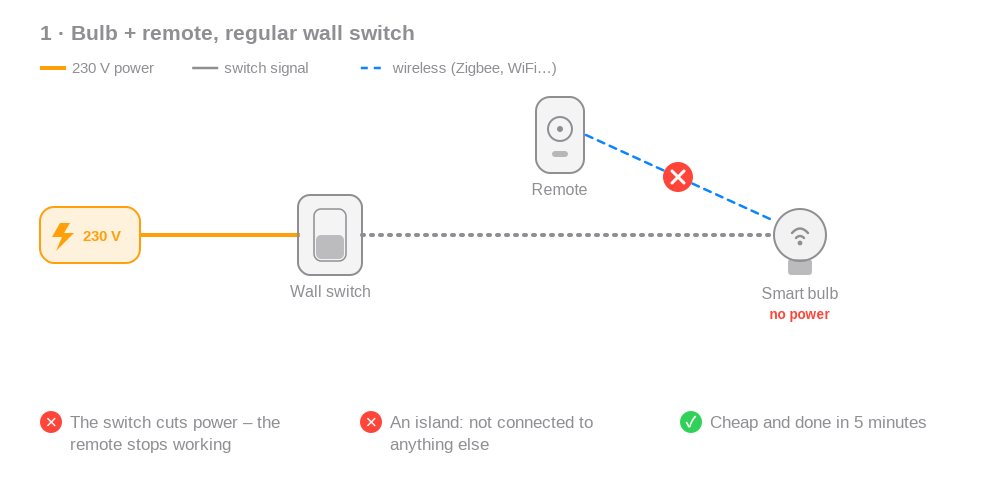
There's a second, less visible problem. A bulb paired directly with a remote is an island. It knows nothing about other lights, sensors or that the sun has just set. You can't link it to motion in the hallway or switch it off together with the whole house when you leave. That's exactly why in What counts as a smart device I don't consider it smart yet.
There are two fixes, and you can combine them:
- Build a smart home with a hub – ideally Home Assistant, but IKEA Dirigera, Hue Bridge, Homey and others work too. Only a hub turns islands into a system.
- Fix the wall switch – so the family can keep clicking as usual while the bulb never loses power.
Why the bulb should always be powered
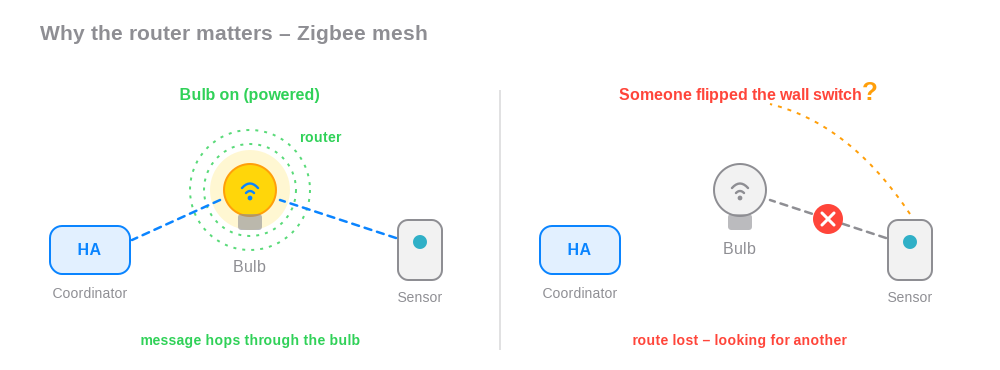
Besides always being controllable, there's another reason. Zigbee (and Thread too) is a mesh network – devices pass messages along, so the network reaches places the hub alone couldn't. That job is done by routers: mains-powered devices, smart bulbs included. More about networks in Zigbee, WiFi, Z-Wave or Matter.
Battery sensors (doors, windows, temperature, motion) are not routers. They attach to the nearest router and send their data through it. When someone switches that router off at the wall, the sensor loses its route and has to find a new one. The result: the sensor goes quiet for a while, an automation doesn't fire, and you have no idea why.
5 ways to wire a light
Let's go through the options from worst to best. In the diagrams, orange is 230 V power, grey is the switch signal and dashed blue is wireless communication.
1. Bulb + remote, regular wall switch
Where most of us started. Works until someone touches the switch. No connections, no automations.
When it makes sense: in a lamp with a cord switch nobody uses, or as a first taste of smart lighting. Not for a ceiling light with a switch by the door.
2. Smart relay + regular light
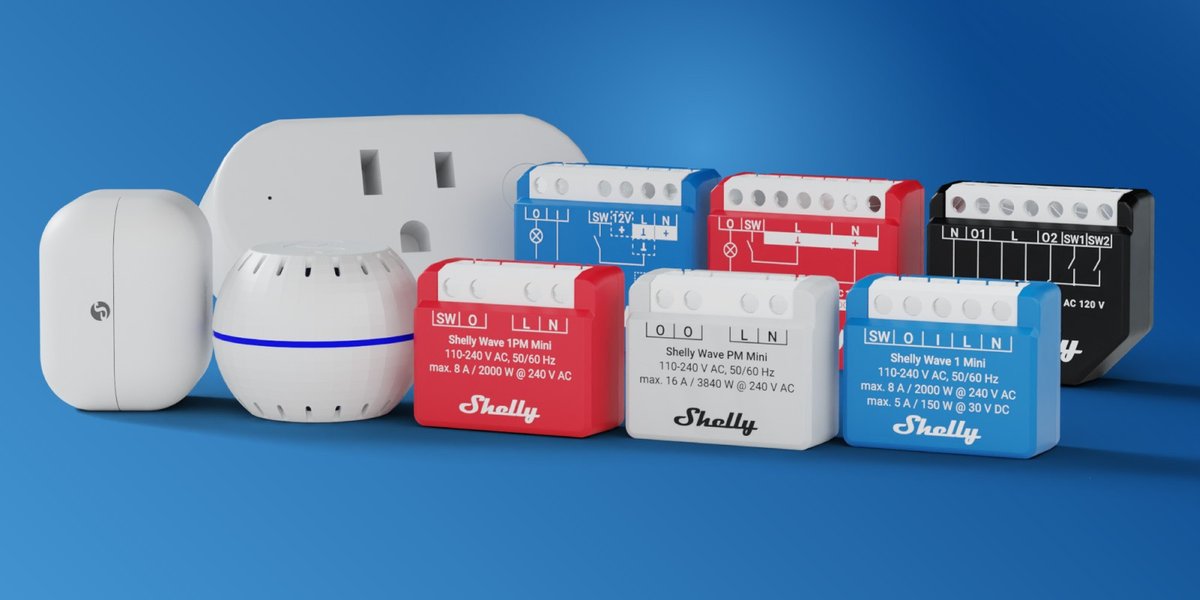
A smart relay hides behind the original wall switch (for example Shelly 1 Mini Gen3, Sonoff ZBMINIR2 or Aqara T1). The switch stays, but it no longer switches the light directly – it signals the relay, which switches the light. The hub can control the relay too, so you get phone control, automations and voice. The bulb can be completely ordinary.
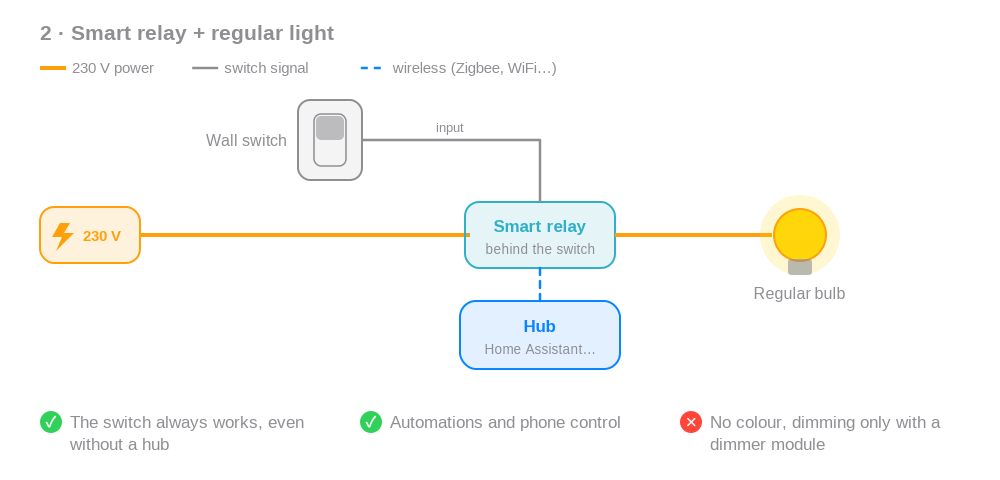
The most robust option. If the hub goes down, the switch keeps working because the relay listens to it directly. The downside: no colour or colour temperature, and dimming only with a dimmer module (such as Shelly Dimmer).
When it makes sense: for most lights in the house – hallway, bathroom, pantry, outdoor lights. If you don't need to change colour, you don't need a smart bulb at all.
3. Smart relay + smart bulb ("half smart")
Same wiring as option 2, just with a smart bulb in the fitting. The switch, via the relay, turns power to the bulb on and off. While it's lit you can change brightness and colour. When it's off it has no power – just like option 1.
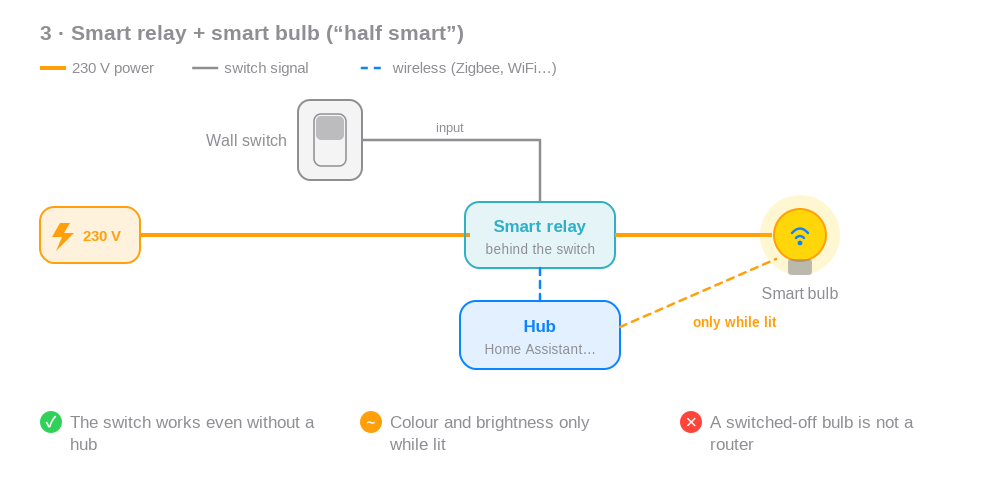
A big step up from option 1: you can switch the light from your phone and from automations (via the relay), and it works without a hub. The "half" part is that a switched-off bulb isn't a router and won't take your colour settings – every time it powers up it comes on the way it's configured (more in the advanced section).
When it makes sense: when you already have a relay behind the switch and only occasionally want a different colour. Or wherever reliability without a hub matters more than perfect smartness.
4. Bulb always powered + input module
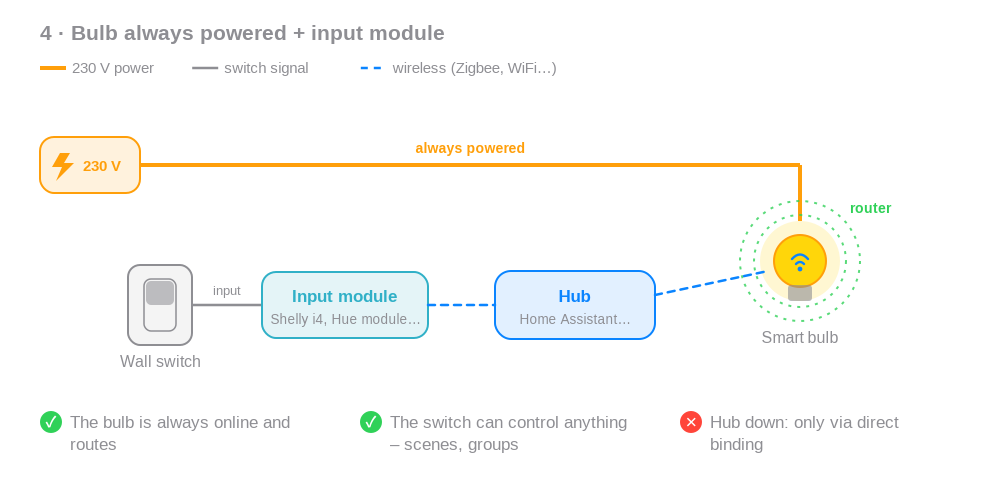
This is "pure" smart. An electrician bridges the wall switch so the bulb is permanently powered. Behind the switch goes an input module – a device that doesn't switch anything, it only tells the hub "someone flipped the switch". The hub then tells the bulb what to do.
Examples of input modules:
- Shelly i4 Gen3 (WiFi) – four inputs, perfect behind a double switch.
- Philips Hue Wall Switch Module (Zigbee) – battery powered, so it needs no neutral wire. There's also a mains-powered version.
- Or no electrician at all: cover the wall switch and stick a wireless button next to it (IKEA RODRET, STYRBAR, BILRESA, Hue Dimmer). It works, but the family has to change a habit.
The bulb is always online, acts as a router, and one switch can control anything: a scene, a whole group of lights, a double-click can turn off the entire ground floor. The downside: when the hub isn't running, the switch doesn't work. You can get around that with direct binding – more below.
When it makes sense: when you have a reliable hub (ideally on a UPS) and want the most out of your switches.
5. Smart relay with a detached input + smart bulb
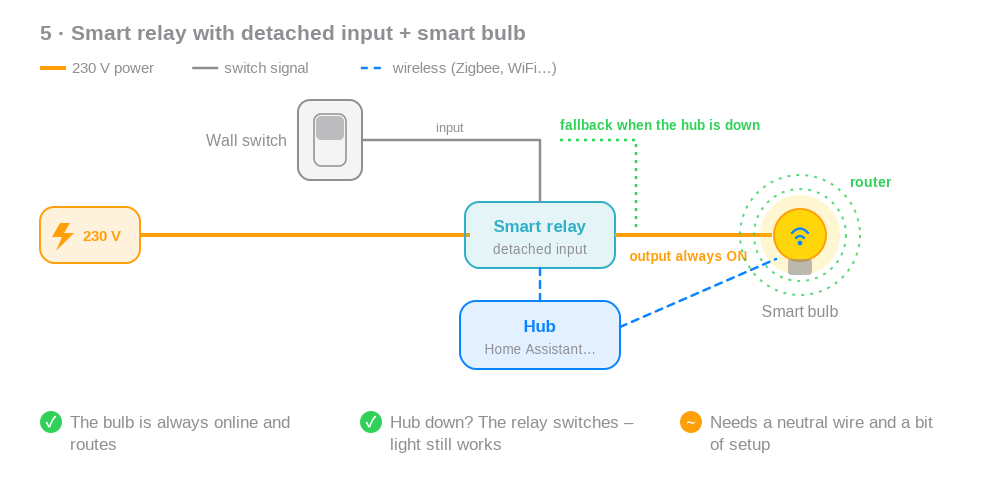
The best of both worlds. The wiring is the same as option 3 – relay behind the switch, bulb behind the relay. The difference is a setting: you put the relay into detached input mode (Shelly calls it Detached, Sonoff Detach Relay, Aqara Decoupled). The switch then no longer flips the relay directly, it only sends a signal to the hub. The relay output stays permanently on, so the bulb has power.
What you gain over option 4:
- A fallback when the hub is down. Shelly Gen3/Gen4 can run a script that switches the relay straight from the input when Home Assistant is unreachable. With ESPHome you set it in the config. The light then works at least like a regular switch.
- Remote bulb reboot. If the bulb gets stuck, power-cycle the relay from your phone. No need to climb to the switch.
- No need to bridge the switch – it's just a setting. You can always go back to option 3.
The downside: a relay behind the switch usually needs a neutral wire and a bit of setup.
When it makes sense: anywhere you want a smart bulb and a wall switch the family uses as before. This is the setup I recommend.
Side-by-side comparison
| 1 Remote | 2 Relay + regular | 3 Relay + smart | 4 Input module | 5 Relay, detached | |
|---|---|---|---|---|---|
| Switch works without a hub | ✅ | ✅ | ✅ | ❌ (only with binding) | ✅ (with fallback) |
| Remote and phone always work | ❌ | ✅ | ⚠️ on/off only | ✅ | ✅ |
| Bulb acts as a router | ⚠️ only while lit | – | ⚠️ only while lit | ✅ | ✅ |
| Colour and dimming | ✅ | ❌ | ⚠️ only while lit | ✅ | ✅ |
| Automations and linking | ❌ | ✅ | ⚠️ | ✅ | ✅ |
| Needs an electrician | no | yes | yes | yes (bridging) | yes |
| Neutral wire at the switch | no | usually yes | usually yes | no (battery Hue) | usually yes |
| Cost | € | € | €€ | €€ | €€ |
| Survives the family | ❌ | ✅ | ✅ | ⚠️ while the hub runs | ✅ |
Which setup to choose
- Don't need colour? Option 2. A smart relay and a regular LED bulb. Cheap and indestructible.
- Want colour and brightness and have a neutral wire? Option 5. A relay with a detached input and a smart bulb.
- No neutral wire and you have Hue? Option 4 with the battery Hue Wall Switch Module.
- Renting and don't want to take anything apart? A wireless button next to the switch and a cover on the switch. Not pretty, but it works.
- Only have a bulb and a remote and don't want more for now? At least set the power-on behaviour in your hub (see below) and put a little note on the switch. Seriously.
For advanced users: Home Assistant setup
Bulb behaviour when power returns
Every Zigbee bulb has a setting for what it does when it gets power. In Zigbee2MQTT it's called Power-on behavior, in ZHA Start-up behavior. The options are turn on, stay off, toggle or restore the previous state.
- For setups 1 and 3 choose On – the wall switch then behaves like a regular one. If you also want the last colour and brightness back, try Previous (not every bulb handles it equally well).
- For setups 4 and 5 choose Previous. After a power cut the lights won't all come on at full brightness in the middle of the night.
Wall switch controls the light via the hub
For setups 4 and 5 you need an automation that turns a flip of the switch into a command for the bulb. With a regular (not push-button) switch it's enough to react to every change of the input. The not_from and not_to conditions stop the light from toggling when Home Assistant restarts.
alias: Living room – wall switch controls the ceiling light
description: Every flip of the wall switch toggles the living room smart bulbs.
triggers:
  - trigger: state
    entity_id: binary_sensor.living_room_switch_input
    not_from:
      - unavailable
      - unknown
    not_to:
      - unavailable
      - unknown
actions:
  - action: light.toggle
    target:
      entity_id: light.living_room_ceiling
mode: single
With Shelly Gen3/Gen4 the input is available as a binary_sensor when the input is in Switch mode. If the entity is disabled in the integration, enable it in the device settings. For push buttons use a device trigger – that gives you double-click and long press too.
Fallback without a hub: binding
Zigbee devices can also talk directly, without the hub. It's called binding. An input module (such as the Hue Wall Switch Module) or a relay in detached mode (Sonoff ZBMINIR2) then sends commands straight to the bulb or a Zigbee group. If Home Assistant is down, the light still works – the Zigbee network just has to be running.
In Zigbee2MQTT you set it up in the device details on the Bind tab: the source is the switch, the target is the bulb or group, cluster OnOff (and optionally LevelCtrl for dimming). Support depends on the specific model and integration version, so test it afterwards with Home Assistant switched off.
Setup 3: power first, then colour
When the bulb sits behind a relay and you want an automation to turn it on, say as a night light, you have to switch the relay on first. The bulb then needs a few seconds to rejoin the network before it listens.
alias: Hallway – night light
triggers:
  - trigger: state
    entity_id: binary_sensor.hallway_motion
    to: "on"
conditions:
  - condition: time
    after: "23:00:00"
    before: "06:00:00"
actions:
  - action: switch.turn_on
    target:
      entity_id: switch.hallway_ceiling_relay
  - delay: "00:00:03"   # the bulb rejoins the network after power-up
  - action: light.turn_on
    target:
      entity_id: light.hallway_ceiling
    data:
      brightness_pct: 10
      color_temp_kelvin: 2200
mode: restartSeveral bulbs in one fitting
If a chandelier has three bulbs, don't send three commands in a row – they light up one by one like popcorn. Put them in a Zigbee group (in Zigbee2MQTT and ZHA alike). The group gets one command and all the bulbs react at once.
Things to watch out for
- Never put a smart bulb behind a regular dimmer. The dimmer chops the voltage; the bulb flickers, buzzes and can get damaged. Replace the dimmer with a switch or a smart module.
- Neutral wire. Most relays need one. Without it there are modules like Shelly 1L Gen3 or Sonoff ZBMINI-L2, but check before buying whether they support a detached input. With LED loads and no neutral, the light may glow faintly or flicker.
- Wall box depth. The relay has to fit behind the switch. If you're building or renovating, ask for deeper boxes – they cost about the same.
- Two-way (staircase) switches. They work great with a relay in detached mode – every flip of either switch is one signal. They just need to be wired to the input correctly.
- WiFi vs. Zigbee relays. Shelly (WiFi) is convenient and can run scripts. Zigbee relays (Sonoff, Aqara) strengthen your Zigbee network because they route themselves. Both are fine – pick whatever you build on.
In one sentence
A smart bulb should always be powered and the wall switch should just be a button that sends a signal – and if you also want it to work without the hub, put a smart relay with a detached input behind the switch.
If you don't have a hub yet, continue with Home Assistant explained and have a look at 6 rules I build my smart home by – the first one is about exactly this.